AppsIndex.db is a per-user SQLite database that holds the Start Menu’s local inventory of installed applications and their cumulative launch counts.
The CBS package and its artifacts have received limited attention in forensic literature. The most notable prior work is an article by thedigitaldetective published on Detect FYI in February 2026, which introduced AppsIndex.db as a new Windows 11 artifact for tracking Start Menu application execution. That work documented the database’s schema, its relationship to Start Menu shortcut locations, and its interaction with the UserAssist privacy setting.
The CBS package
The Start Menu search experience on Windows 11 is delivered by a packaged Windows app, MicrosoftWindows.Client.CBS_cw5n1h2txyewy. The cw5n1h2txyewy suffix is a publisher ID hash derived from the package’s signing certificate, and that particular value identifies it as a Microsoft-signed component built into Windows rather than anything a user installed. Like any UWP package, it gets its own directory under %LOCALAPPDATA%\Packages, and it maintains its own local data stores to serve search results, rank suggestions, and cache web content.
AppsIndex.db is one of three artifacts I’ve found worth pulling out of that package. The other two, a Chromium IndexedDB store of Start Menu search interactions and a WebView2 disk cache full of Bing queries, are covered briefly in the CBS Forensic Toolkit post. This one is the simplest of the three, and the one that reaches back furthest across Windows 11 builds.
Where it lives
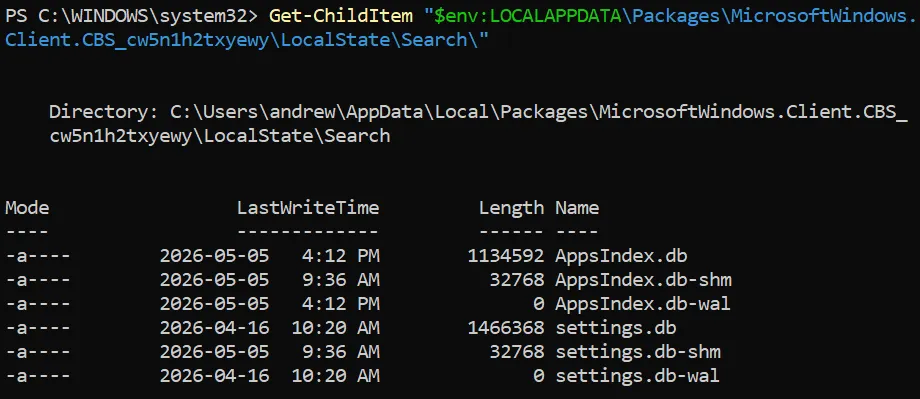
The database lives at:
%LOCALAPPDATA%\Packages\MicrosoftWindows.Client.CBS_cw5n1h2txyewy\LocalState\Search\AppsIndex.dbAlong with its Write-Ahead Log (WAL) and shared-memory files (AppsIndex.db-wal and AppsIndex.db-shm) in the same directory.
Windows version scope
A critical question for any new artifact is: on which versions of Windows does it exist? To answer this, I conducted systematic testing across six Windows installations, examining whether the CBS package directory contained the artifact. Each system was installed fresh, and on each system the user signed in, exercised the Start Menu (typing queries, hovering over results, launching apps), and then the package directories under %LOCALAPPDATA%\Packages were enumerated.
| OS | Version | Build | AppsIndex.db |
|---|---|---|---|
| Windows 10 Pro | 22H2 | 19045.6456 | No |
| Windows 11 Pro | 21H2 | 22000.194 | No |
| Windows 11 Pro | 22H2 | 22621.1 | Yes |
| Windows 11 Pro | 23H2 | 22631.2861 | Yes |
| Windows 11 Pro | 24H2 | 26100.1742 | Yes |
| Windows 11 Pro | 25H2 | 26200.8037 | Yes |
Testing suggests that the artifact isn’t present on Windows 10. On those systems, Start Menu search processes are hosted by SearchApp.exe from the legacy Microsoft.Windows.Search_cw5n1h2txyewy package. App ranking on the Windows 10 systems tested also seemed to rely on a different set of files than AppsIndex.db.
On the Windows 11 systems examined, the artifact appeared somewhere between 21H2 and 22H2, with the consolidation of app ranking into AppsIndex.db. Windows 11 21H2 acts as a transitional build, where the legacy Microsoft.Windows.Search package directory still existed, and Start Menu search had moved to a new host process, SearchHost.exe. By 22H2, app ranking has moved into AppsIndex.db.
Data structure
AppsIndex.db contains entries for applications that have a shortcut in either of the two standard Start Menu folders:
%ProgramData%\Microsoft\Windows\Start Menu\Programs(machine-wide, applies to every local user)%APPDATA%\Microsoft\Windows\Start Menu\Programs(the current user’s personal Start Menu folder)
These folders contain shortcut .lnk files to applications installed for all users as well as for the currently logged-in user. Applications are typically added to the Start Menu (and consequently to AppsIndex.db) through two primary mechanisms: during application installation, when the installer creates a shortcut in a Start Menu folder, or through user pinning, when a user right-clicks an application and selects “Pin to Start”.
The application data of forensic relevance lives in an FTS5 virtual table named tiles. Its columns include the following:
| Column | Description |
|---|---|
serializedId | Composite identifier prefixed by W~ for Win32 desktop applications or P~ for packaged (UWP/MSIX/Store) applications, followed by the application’s identifier. For Win32 entries, the identifier is typically a Known Folder GUID path. For packaged entries, it is an AUMID. |
appId | The identifier portion of serializedId. |
displayName | The application’s display name as shown in the Start Menu. |
launchCount | Cumulative number of times the application has been launched, from any execution source. |
cRank | A numeric rank value, presumed to feed Start Menu ordering. Its meaning isn’t yet fully characterized. |

tiles_content shadows tiles directly, exposing the same per-row data under the renamed columns c0 through c4. A handful of other tables sit alongside tiles. synonyms is a Microsoft-curated dictionary of alternate search terms mapped to display names (e.g., 1paa to 1Password) and doesn’t record user activity. ranks holds (appId, cRank) pairs over a far wider corpus than tiles but doesn’t appear to record user activity either.
Forensic value
Broad execution tracking
The most significant characteristic of AppsIndex.db is that its launch counts reflect execution from sources beyond the Start Menu itself. Controlled testing using the Clock app (P~Microsoft.WindowsAlarms_8wekyb3d8bbwe!App), starting from a baseline launchCount of zero, confirmed the count increments by exactly 1 when the application is launched in any of the following ways:
- From a Start Menu search.
- From the Run dialog.
- By double-clicking the entry in File Explorer.
- By double-clicking a desktop shortcut for the app.
- By clicking a Taskbar pin for the app.
- By clicking a Start Menu pin for the app.
Identifying installed applications
Even setting aside the launch count, AppsIndex.db provides a useful inventory of applications that were present in the Start Menu at the time the database was last updated. This can be valuable for identifying security or hacking tools that were installed, applications that have since been uninstalled but may still have entries in the database, and UWP/Store applications alongside traditional Win32 applications.
Relationship to other execution-tracking artifacts
AppsIndex.db overlaps several traditional Windows execution artifacts but covers a different slice of activity.
FeatureUsage AppLaunch tracks Taskbar-pinned application launches only. AppsIndex.db is broader, counting launches from many sources, but is itself limited to Start Menu-indexed applications.
UserAssist tracks per-user GUI shell launches. For Start Menu-indexed apps, AppsIndex.db’s launchCount can be used to corroborate or sanity-check the UserAssist RunCount.
Prefetch records executions of any binary regardless of how it was launched, including non-GUI processes, but only retains the most recent eight run timestamps per file and the count can reset when the Prefetch file is recreated. AppsIndex.db records a cumulative count without that eight-entry cap, but only for Start Menu-indexed apps and without per-launch timestamps.
Limitations and caveats
No timestamps
AppsIndex.db doesn’t record when an application was launched, only how many times. This is a significant limitation for timeline-based analysis.
Tracking scope
The database only tracks applications that have shortcuts in the Start Menu folders. An application that’s installed but doesn’t create a Start Menu shortcut won’t appear. Additionally, applications not pinned or without shortcuts in these locations aren’t tracked.
Records purged on uninstall or unpin
Testing has shown that when a Start Menu application is unpinned or its parent application is uninstalled, the corresponding row in AppsIndex.db is purged almost immediately, leaving the database reflecting only currently installed or pinned Start Menu applications. As a result, the database carries no inline record of apps that have been removed.
It’s theoretically possible for purged rows to be carved from the SQLite freelist or unallocated pages using a forensic SQLite recovery utility, but this hasn’t yet been tested.
Privacy setting interaction
On Windows 11, the user can opt out of the underlying telemetry that feeds both AppsIndex.db and UserAssist by switching off “Improve Start and search results” under Settings > Privacy & security > Recommendations & offers.
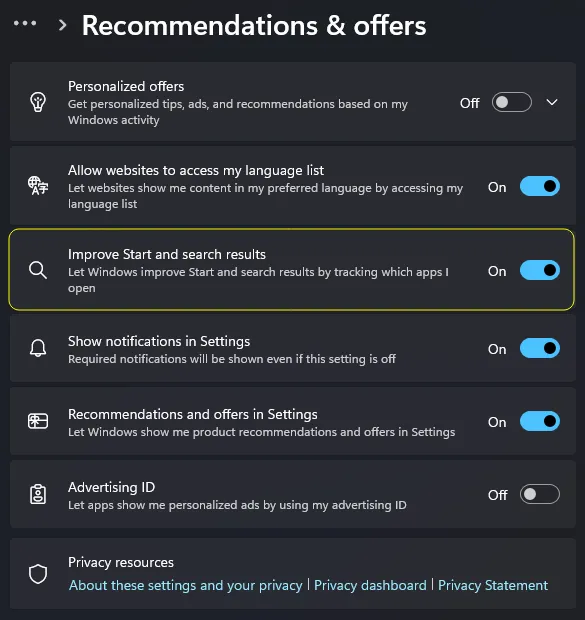
That toggle maps to the registry value HKCU\SOFTWARE\Microsoft\Windows\CurrentVersion\Explorer\Advanced\Start_TrackProgs. The toggle’s effect on UserAssist (and its general anti-forensics implications) has been documented previously. Testing for this research validated that the same toggle also halts updates on AppsIndex.db.
The registry value isn’t present on a fresh Windows install. It’s created the first time the toggle is interacted with, which means the presence of the value itself (with either 0x0 or 0x1) is a forensic signal that tracking has been disabled at least once on this profile:
| Registry state | Forensic meaning |
|---|---|
| Value not present | The toggle has never been touched on this profile. Tracking has run continuously since profile creation. |
Start_TrackProgs = 0x0 | The toggle is currently off. Existing AppsIndex.db entries were wiped when it was flipped, and no new launchCount updates are being recorded. |
Start_TrackProgs = 0x1 | The toggle was switched off at some point and later switched back on. Only launches since the re-enable are present in the database. |
An empty AppsIndex.db, or a database containing only recent entries, therefore can’t be read as evidence that the user didn’t use the Start Menu.
WAL file importance
As with any SQLite database, the Write-Ahead Log (AppsIndex.db-wal) may contain more recent data than the main database file. Examiners should ensure they collect both files (along with AppsIndex.db-shm) and that their tools process the WAL when reading the database.
Parsing it
The CBS Forensic Toolkit parses forensic artifacts from the Windows Start Menu search subsystem.
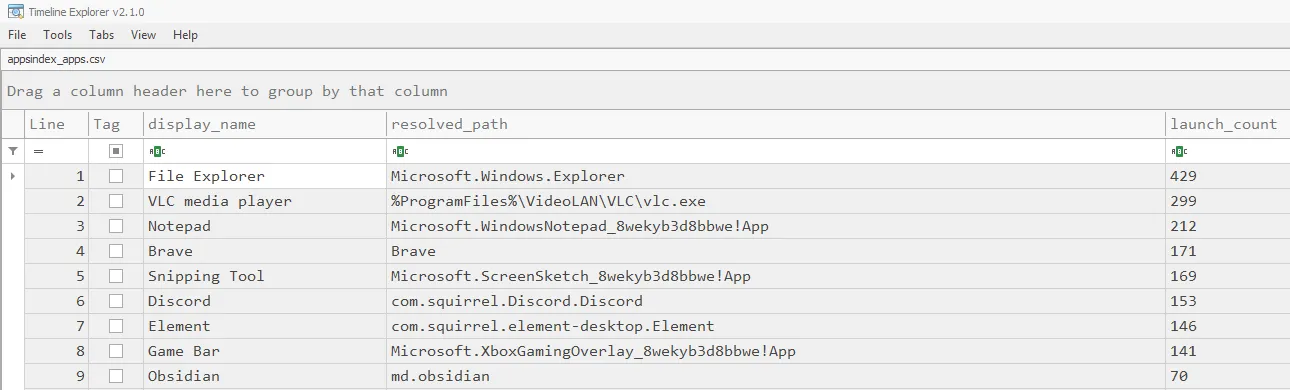
The AppsIndex parser (cbs_appsindex_parser.py) walks the tiles table in AppsIndex.db, resolves each entry’s serializedId into a human-readable path, and writes the result to appsindex_apps.csv.
Conclusion
The Windows Start Menu is a ubiquitous interface that users interact with daily, often without conscious thought. Behind this familiar interface, the CBS package quietly maintains a detailed record of application usage that can serve as valuable forensic evidence. AppsIndex.db provides evidence of program execution with cumulative counts that span every launch source, along with an inventory of the applications present in the Start Menu at the time the database was last updated.
Areas of further research are needed. Recent reporting on a Microsoft initiative referred to as “Windows K2” indicates the Start Menu is being rebuilt in WinUI3 as a native Windows app, replacing the current WebView2-hosted experience. The same reporting also describes new in-product controls for disabling the “Recommended” section, which could expand the privacy-toggle surface beyond the Start_TrackProgs setting documented above.
AppsIndex.db is less tightly coupled to the hosting model than the CBS package’s other two artifacts and may survive the transition, but its location and schema can’t be assumed. Examiners working on systems updated to whichever Windows release ships the K2 rewrite should re-validate the presence and contents of the artifact before relying on the techniques described here.
As Windows continues to evolve, the forensic community must evolve with it. Examiners who understand these patterns will be better equipped to find evidence where others might not think to look.
References
- thedigitaldetective, Introducing AppsIndex.db: New Windows 11 artifact for tracking Start Menu application execution: detect.fyi/introducing-appsindex-db
- Cyber Triage, UserAssist forensics (see “When UserAssist Misses Data”): cybertriage.com/blog/userassist-forensics-2026
- Group-IB, FeatureUsage: Reconstructing user activity for forensics: blog.group-ib.com/featureusage
- Marcin Otorowski, Calculating hash part of MSIX Package Family Name: marcinotorowski.com/2021/12/19/calculating-hash-part-of-msix-package-family-name
- ItsTechBased, Huge changes in Windows 11: New taskbar, better Start, and Explorer improved performance: itstechbased.com/huge-changes-in-windows-11
- Windows K2 Start Menu and shell changes [Video]: youtube.com/watch?v=t5MdvtN14GY
- CBS Forensic Toolkit source: github.com/exfiltrace-labs/cbs_parser
Comments